Showing posts with label Design. Show all posts

Monday, 28 January 2013

Biosual Viewer. First prototype.

Hello there!

So here is the first post of actual work of the year, although most of it was done last year. So, the last time I post here the status of the protein-protein interaction viewer looked like this: http://biosual.cbio.uct.ac.za/interactions/, and my efforts since november have been focused in making it look like this: http://biosual.cbio.uct.ac.za/biosual/tests/pinv/pinv.html Notice the difference?
No, I am not talking about the logo and new name. So try again, check both pages and see the difference! If you didn't notice a change its because I did my job well, in case you notice let me know and I will try to correct that.

Warning: I am going to start being quite technical so if you are not into web development you might get lost. Badly lost!

The thing is what i did was to change the way Ajax-Solr (the library I'm using to get the data) includes its widgets so they can be loaded from a config file, I also make sure all those widgets are now completely agnostic of the other widgets, and I also create some PHP scripting in order to generate a single javascript that contains all the Ajax-Solr files, all the widgets and its dependencies, so pretty much I change hell of a lot in the background with the goal of having a single config file indicating which visual components should be included in the page. It is still in a work on progress stage, but the fact that I'm getting something as close to the application with the original version of AjaxSolr, makes me thing I'm in a good path!

You may be asking why to change so many things if at the end it is going to look almost the same. Well that has to be with the big picture of my project. The viewer has to be dynamic enough to display different setups that users can configure, so what im doing here is been able to create a runnable javascript that include all the required code to show the different graphic components by just passing few parameters.

The key is the configuration file, which is saved in the installation of biosual, then retrieved identifying it by its id. this separation allows me to in future develop a tool to create that configuration file. I'm sure there are lots of requirements i have to go through to get that authoring tool, however the process of this development help me to identify lots of them.

So lets explain some details of this whole thing. I'll start for the PHP script, mainly because it kind of works as the controller of the whole thing and in that way it gives me the chance to have some sort of order in the descriptions. The idea is to have a single point to ask for the resources of a viewer instance. A html page that wants to include an instance of the viewer requires to have an empty [div] component that will be the container of it, and to include as a javascript the path to the PHP script sending as parameters: (i)the id of the instance to create, (ii)the target id, and (iii) the type of data.
There are 3 types of data so far: json returns the MDC configuration file,that indicates which widgets/components are part of this viewer instance; js to get a bundle of all the java scripts files associated with the given id; the third option is css to get a single file with all the css files from the different widgets, dependencies etc.

So the basic HTML file that includes a viewer instance is like follows:
<!DOCTYPE html PUBLIC "-//W3C//DTD XHTML 1.0 Strict//EN" "http://www.w3.org/TR/xhtml1/DTD/xhtml1-strict.dtd">
<html xmlns="http://www.w3.org/1999/xhtml" xml:lang="en" lang="en">
 <head>
  <title>PINV - Biosual Architecture</title>
  <link href="../../include.php?id=pinv&type=css" media="screen" rel="stylesheet" type="text/css"></link>
  <script src="../../include.php?id=pinv&target=here&type=js" type="text/javascript"></script>
  <link href="http://fonts.googleapis.com/css?family=Jura" rel="stylesheet" type="text/css"></link>
 </head>
 <body>
  <div id="here">
</div>
</body>


Notice that there is just a single javascript tag in this code, the PHP script will create a unified resource that includes the dependencies, the whole Ajax-Solr library, the selected widgets ant its own dependencies. The order to include all this files is key to make the whole thing to work, so here is a high level view of this, and below some explanations of each step.


  1. Add a list of mandatory dependencies, which in the current version is composed by jquery, jquery-ui, ajax-solr and biojs. This dependencies can be located in the same machine where the script is located or somewhere accessible via Web.
  2. The configuration file is loaded through the id parameter passed in the URL.
  3. One of the options in the config file is to assign a template. this is basically a HTML piece of code that works as layout for the components. In this step the PHP script creates a variable in the javascript code containing the selected template, and them a piece of executable js is added to inject the template into the target div.
  4. There are scripts that are associated with a configuration in particular (eg. making 2 widgets to work together) in this case those scripts are listed in the configuration option js and the PHP script adds them in to the response here.
  5. And here is the core of a viewer configuration: the widgets. A widget should be a component that can be executed by itself in the biosual framework, and follow the idea of ajax-solr iwgets, having functions that will be caled at the initialization of the widget and whenever new data is been captured for the Viewer. The way a widget is defined in biosual(at least for now) is as a sub-folder in the folder widgets, it requires a file there called widget.json, the file follows a JSON format and allows to specify the javascript file of the widget, any dependencies a style file on CSS format, and a HTML snippet of code that will be injected whenever the MDC file indicates. An example of the widget configuration below.
    {
        "name": "Search with Autocomplete",
        "description": "a text based widget to start a search",
        "dependencies":["jquery.autocomplete.js"],
        "dependenciesCSS":["jquery.autocomplete.css"],
        "js": "AutocompleteWidget.js",
        "html": "AutocompleteWidget.html",
        "css": "AutocompleteWidget.css"
    }
    

    This configuration indicates the widget is in the file "AutocompleteWidget.js", but that it requires the file "jquery.autocomplete.js". it also contains the CSSs, HTML and some metadata for the widget.
    A widget can be created but never been used, it is just when is part of a MDC file, that is included, starting for including all its dependencies, then the widget file itself, and in last the HTML to be included in the target explicitly indicated in the MDC file.
  6. A subset of the MDC file is included: widgets, parameters and server
  7. Finally the loader.js is included. This is a piece of software that uses the previous parameters and scripts to create an instance of the Ajax-Solr manager that includes all the widgets and starts the page.
  8. The final resource is included in the web page. The loader.js is executed once the page has been loaded.
There are implementation details that I will post in a future post but for now this one is long enough. By the way, if anybody is interested enough in checking put the code I have a git repository with it: https://github.com/4ndr01d3/biosual/tree/ajaxSolrFromPHP

So let me know any opinions!!
Cheerio!!!

Saturday, 12 May 2012

Area Selector and Chromosome Component

.position() .offset() .left . top .width() .height() .parent()

Those are the 'words' that I have written the most during the last few days. And the ones that I have spoken I had better avoid mentioning, in case it causes my blog to be censored.

Here is the story: after having finished the Chromosome component, I thought it would be cool to freely select and adjust areas in the chromosome, and not just select the bands as it was doing. I thought that a semi-transparent div at the top of the chromosome could do the trick, so it was just a matter of some styling and I have a div that shows what's selected in the chromosome. Then it's just javascript playing with the DOM to modify position, and size.

Simple! So let's start with a static HTML and its CSS. The Div is going to contain other divs that will work as the points to scale the div:

<div class='selector'>
  <div class='scaler top'></div>
  <div class='scaler bottom'></div>
  <div class='scaler left'></div>
  <div class='scaler right'></div>
</div>


So I defined a couple of styles in the CSS, defining the transparency, the position and size:

.selector {
  border: 1px solid #FF0000;
  position: absolute;
  margin-left: 0px;
  margin-top: -5px;
  height: 25px;
  width: 30px;
  z-index: 10;
  background-color: rgb(100%, 75%, 75%);
  opacity:0.4;
  filter:alpha(opacity=40); /* For IE8 and earlier */
}

.scaler {
  position: absolute;
  height: 5px;
  width: 5px;
  background-color: white;
  border: 1px solid red;
}


You can check the fully working code here. It looks like this:

12- Snapshot of the chromosome component with a overlapping div

So how hard could it be to make that div fully dynamic as an independent component? Easy peasy!
How wrong I was!! Well I'm not trying to say that it's incredibly complicated, but something that I estimated doing in one day took me the whole week. Hope that this is not going to be the rule in the rest of this project.

In reality the whole thing is not complicated, it's just a matter of transforming coordinates from the HTML document to the Chromosome space, and vice-versa. Plus having control of events to drag&drop the scalers to modify the size, location of the selector div. And saying it in that way makes me think again that it was something easy.

So, I tried to do the trick with mousedown() mouseup() events recalculating coordinates and redrawing things, but this didn't work because if you move your mouse too quickly you will move out of the scaler div, and it wont recognise the mouseup() event.

Then I realised that I was committing the classic mistake of reinventing the wheel. I mean that above is the description of a Draggable component in jquery UI, and for a moment I even thought that the whole thing could it be done by the Resizable component. But this one just modifies the size from the bottom-right corner, and what I want is something I can change from any side, conclusion back to my idea, but now using a jqueryui.

Here is the code for the draggable actions of the right scaler, the other scalers are pretty much the same, although the left and top required modifying the position of the div and not just increasing the width or height.


$("#"+self.opt.target+" .selector .right").draggable({
  axis: "x",
  start :function(event) {
    self.updateScalers();
    $(this).parent().css('border-right-width',"0px");
  },
  stop :function(event) {
    $("#"+self.opt.target+" .selector").width(self._removePx($(this).css('left'))+5);
    $(this).parent().css('border-right-width',"1px");
    self.updateScalers();
    self.raiseEvent('onRegionChanged', {
      region : self.getCoveredArea()
    });
  }
});


Obviously there is a lot more code than this, but this pretty much describes the task. The function updateScalers, repositions the divs that I used to create the effect. It also recalculates the limits of the enclosing div.

Another thing that I did for this component was to make sure that if the container changes its position, the constrains get automatically updated. In order to do that i found a plugin for jquery to watch a DOM element and react in that case. You can read some details here.

So this is how the Area Selector looks, I also created some methods and triggered some events in this component, so it can really interact with other elements.

13- Snapshot of the Area Selector component

You can play with it here, and soon it will be on the repository. I will update this post once it is online.
I just finished the interaction between this and the chromosome component and I will post about it at the beginning of the week.
For now, I'll be back to my super-lazy weekend, hope you guys are enjoying yours. :-)


EDIT: Here is the link of the AreaSelector in the registry (LINK)

Tuesday, 24 April 2012

Sketches (Part II)

Hello There,

Sooner than expected I'm here again writing a new post. To be honest this is some material that I had last week, but the previous post was getting too long and it was taking me a lot of time, therefore I split it and here is a second part. So continuing the idea here I'm gonna show some sketches i made to start having a better understanding of the project.

In this post I will focus on the configuration of a Domain in the Multi-Domain Configuration MDC mode (Remember the 3 parts the project is going to be divided). Here I'm assuming that a lot of components have previously registered in the BIOsual repository, this is important to me because is helping me to define the requirements for the repository mode.

So, once a domain is in the dashboard it needs to be configure, and to open the configuration panel a click in the domain is all am asking for. If is a predefined domain most of the configuration is done, if is a new Domain, the information has to be fill from scratch.

The way that I imagine the domain configuration now, includes 5 different sections, that in the sketches I have organise as tabs: Reference, Tracks, Entry Points, Components and Filters. Obviously at this stage everything can change, but this is the route I'm tracing and as long I reach the goal I'm willing to make changes once on it.

Domain - Reference 

Every domain has to have a reference source of information, for instance,  the whole genome of an species organised by chromosome for a DNA domain or all the available sequences for the Protein domain.

This information can be acquired in different ways.


4 - Setting up the reference of a domain.
So in the sketch I'm showing 3 options to load the reference:

  • By using a DAS source, this can be done by selection one of the more than 190 DAS reference sources or by directly inputting the URL of the DAS source.
  • Sequence Files (web): Some NGS files like BAM allow random access through http requests. This make possible to use a remote file as a reference without having to load the whole file.
    The full genome can be divided in several of those files, so the system should allow to load more than one, and provide a way to identify them. Thats why I add the ID field.
  • Sequence Files(local): Other option might be to have local files as reference. For the case that the files are in the user machine. This might be tricky because of the limited access of javascript into the client machine.
BTW, does anybody knows if there is anything similar to BAM that just includes the sequence, like a fasta file that can be accessed in a particular position??

Other ways of loading a reference can be using databases, web services, or many other ways that I can not even thing about it and thats why this is based on modules that have to be registered in the BIOsual repository.

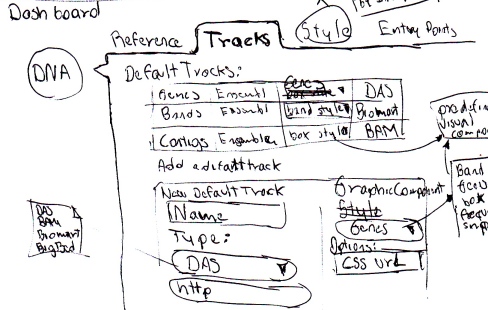
Domain - Tracks

And here guys you will have to apologize me, this is the most confusing of my sketches so far, and that's just a sign that I'm not sure about how to deal with this info.
Tracks are the classical way of displaying biological information in context to a reference (eg. Ensembl, Dasty3, UCSC genome browser, etc.) And basically a track consists in drawing a box in a position that aligns directly with the reference, so you can see where an annotation is located in a chromosome, protein or any other sequence.

5 - Setting up the visible tracks of a domain.
So each domain can have tens of tracks, coming from different locations in different formats to be displayed in different ways. Here is another place to modularise.

I will need adaptors for reading formats, I have to get a consensus of which information is relevant here and been able to put it in the same way no matter how is the source defined.

The system also requires to have options to visualise this info, the boxes idea explained above might be generic one, but for instance genes are composed by a series of exons and introns and the common track representation is boxes for the exons and lines for introns. Other annotations have an score, and a histogram representation might be more adequate.

So the sketch number 5 shows that when in the tab to configure the tracks, a list of the already set tracks is displayed, info in the list can be edited, tracks can be removed from the list and the tracks should be draggable to organise its order.

An option to add a new track is presented and if clicked a form should be injected in the config panel. This form depends on the type of source, because the way of access info changes, the form has to be defined as part of the module. So for example if the type of source is DAS the interaction should be similar to the one for the reference.

The visualisation method use for a particular track is also chosen in this form, and it might contain advanced setting for it, such as to associate a CSS style file.


Domain - Entry Points

The way of accessing the information vary from domain to domain, for example in genomes, isnormal to go to a particular location indicated by the chromosome and the range of base to visualise, but in proteins there are not chromosomes, and the way usual way to access is by the accession number and the location is not that important because the length of those sequences is not really big.

6 - Setting up Entry Points for a Domain

And then, here again the idea of modularise, visual components have to be register to select a region, and is the task of the designer of a MDC to select the appropriate Entry Point selector.
The image shows that for DNA a karyotype selector is set, to allow seen the high level structure of the whole genome.

But more than one Entry Point selector can be desired in a Domain, in the image I also consider that a location selector, and a search in track, the first one can be as simple as text boxes to capture the coordinates, or a slider to select a region or any other interface that allows the selection a region in a genome.

The search in Track is the way I can think in a generic component that can offer the functionality of accessing directly a gene for example.


Domain - Components

Sorry is getting long again is just 2 more to go, the other tab to configure a domain is to include other components that are not displayed as tracks, mainly because there are not associated with a location or because its content cannot be represented in a unidimensional graphic interface. For instance the 3D structure of a protein or its non positional annotations.

7 - Other Visual Components

This components have to be also registered in the BIOsual repository, and each of them have to have their own configuration values to be display in this tab. 


Domain - Filters

And finally and optional feature that i thing can be really useful, a post query filter based on tracks where the designer can define a rule to accept or reject an of the annotations in the tracks.


8 - Filtering the collected data

For now I think that the rule should be define by indicating, the track is going to affect, if is inclusive or exclusive, the parameter to filter, and operator and a value. So in the image, a rule is defined to exclude all the features in Track 1 with a score higher or equal than 0.8

As an optional feature this might not be part of the firs prototypes but I think is something cool to have in mind.


I was getting quite technical for some moment do it might be a boring post, I had fun drawing this sketches, but the most I write the most i realise in what kind of project I'm embarking myself. But i suppose is part of the fun. So if you made it to this part of the post and have any comment/idea/question please let me know.

Un fuerte abrazo,

Gustavo.

Friday, 20 April 2012

Sketching (Part I)

Hey there people!

So I still quite excited about this project, and I hope this attitude last for long, but I know myself and that's usually not the case. So, trying to use this enthusiasm in the best way, I decide to start by creating some sketches of how I imagine the app has to be, and hopefully this will help me to define a good set of requirements. All this with the idea that whenever I'm not so inspired i can just take a requirement and work on it, and use that to find the enthusiasm again, or at least to progress even in the not so cool times.

Let's stop the chit-chat and let me show you which ideas I have have this week.

Firstly, I think the key for a system like this(at least one on the keyring) is to modularize. From the input methods to the visual components. And when I talk about modularize I'm thinking in defining a plug-in architecture that supports the control of the different components, and for instance, if a new format for dealing with annotations is found, a input component can be created and the rest of the system can then used without interfering with other parts.

To achieve this a think is necessary to divide the system in 3 parts (you know our all friend "divide & conquer):

  • A repository for components of different types(input, filters, visualisation, etc.). 
  • A Multi-Domain Configuration (MDC) editor, that allows to define which domains are going to take part of a visualisation, how to relate those domains, which annotations will be displayed, etc.
  • An the visualisation itself, where the user for example choses a location in a chromosome, and the related annotations are displayed, and the other domains also get updated in the corresponding region.
And for now my ideas are being centered in the MDC editor (and yeah, im gonna start using that acronym a lot). So here I'm going to explain how I imagine this side of the system, and for that I am putting some handdraw sketches that I did and scan, so lets start for apologising for my awful handwriting, but I'm blaming the QWERTY keyboard for it(no really i had awful handwriting before been tied to a computer).

The approach I'm using here is not formal at all, and I'm continuously moving from web design characteristics to core requirements, look&feel idea, algorithms and implementations. I just hope that by writing about it I can start organising my chaos.

Anyways here some of those sketches with a bit of explanation of it.

MDC Menu


The first one is a to show the high level options that the MDC editor should have, I initially though I was going to call this menu dashboard, but then i decide is better to called MDC and the dashboard is the area where the action will happen(Next images).

1 - MDC Menu. High level options of the MDC Editor.

Classic File menu options are here, not very exciting. New, will clean the dashboard and will take the normal preventive actions to avoid losing changes. For Open and Save I will have to create a file format that includes all the configuration details of a MDC. I've been a XML fan for years, but all this been JavaScript, makes me think that this format has to be JSON.

Notice that those options dont include any server processing, I'm thinking here in creating the file in JS and the user can save this file locally, and to load his MDC it uses the Open option. Having MDC saved on the cloud is also an option, but that will requires users and authentication and I'm going to focus in a application that does not require any kind of authentication.

The Templates sub-menu contains a set of previously created MDC that are almost ready to use, for example, a 2 domains MDC: Human DNA from Ensembl and Proteins from UniProt; mapping them through an alignment DAS server. So in this case a user can have all this ready, including some by default annotation tracks, like genes and OMIM for the human domain, and InterPro and PFAM for the proteins. Then the user can star adding his tracks there, or a completely new domain.

The final option is to Run whatever is on the dashboard. Obviously this will require some validations verifying that all the domains are corrected configured, but if everything is OK this is the start point for the visualisation part of the system. I'm not sure if this is the best way of connecting the parts of the system, and which validations to do, but those are problems for the future Gustavo, not me.

Adding a Domain

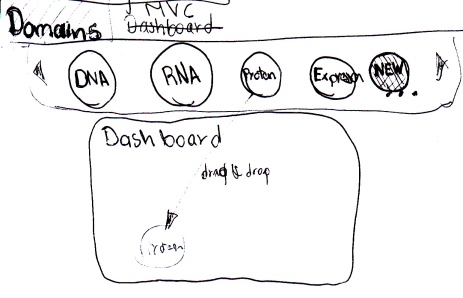
And now with the second sketch, where the user is defining which domains are going to be used in the current MDC.

2 - Adding a domain into the dashboard.

So from another menu, or from a button in the dashboard (I'm thinking in the kind of android ICS screen icons) a set of available domains is displayed, similar idea as in the template submenu. And domains are circles, representing a scope. The user then, can drag a domain and drop it into the dashboard, it will be automatically aligned at the left with any other Domain that has been added.

If the user doesn't want to use any of the templates, it can drag the New Domain, which is a complete empty template that has to be completely defined, from its name to the style used at the visualisation stage.

So the circle idea is inspired in google+ hope that wont creates here a patent issue. ;-)

And I already found some jquery plugins that can create a similar effect, have a look to this demos:


Relations between Domains

Once the user has more than one domain in the dashboard, a relationship can be created between them, and basically my idea is that the relationship is created by a drag an drop gesture:

3 - Creating a relationship by drag&drop domains

I hope the sketch is self explanatory, but basically what I want is that if a domain is drag and dropped over another domain a relationship between them is created. Logically there is a lot more to define, and therefore a configuration panel for the relationship has to be open once a relationship is created.

Tons of things to define here, like what if other configuration panel is already open? how to make sure that changes are not lost? should I allow to create relationships while a configuration panel is open? And we haven't even touch the topic of how to define a relationship. More issues for the future Gustavo, that dude is gonna have lots of problems.

Some examples of drawing arrows in the web:


But it really depends of what is going to be my general strategy for drawing,  if you have an opinion about how should i do the visualisation please let me know, I'm considering things like Raphael, or working with SVG, or Canvas, or just plain alignment of DIV elements... again that shows that i have a long way to go, but I have to start somewhere.


OK this Post is getting long and I dont want to bore my crowd of readers (about 2 friends and my girlfriend). So I will try to post soon to show you more sketches and hopefully a first version of the requirements document.

Hasta la próxima!